Build Your Own Mobile Digital Library to Share Books From Anywhere With Anyone

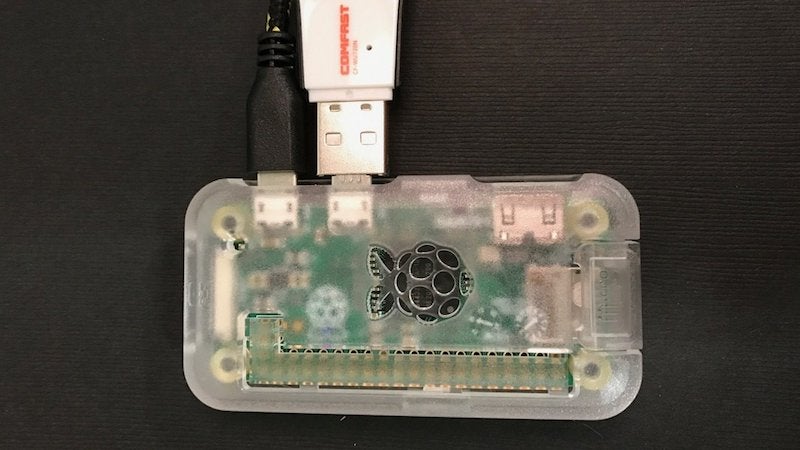
Ever wished you could easily share your collection of PDFs, DIY books, or magazines? Adafruit has a guide to turn a Raspberry Pi Zero into a little digital free library you can take with you anywhere.
This project essentially turns a Raspberry Pi into a Wi-Fi hotspot and small web server that hosts your books or magazines. When you want to share your library collection with someone, just plug the Pi in and they’ll be able to connect to its Wi-Fi network. Sure, there are tons of simpler ways to do this, like a public Dropbox folder, but this is way more fun. It’s especially clever as a means for self-publishers to share their books for free. It doesn’t have to be just for books either, music files, art, games, or whatever else you’re making would work just as well. Just make sure you use this for good instead of distributing someone else’s stuff.
Digital Free Library | Adafruit

from Lifehacker

Handle for Gmail Brings Your Email, To-Dos, and Calendar Together


Chrome/iOS: Handle is the productivity add-on that Google should have made. It seamlessly combines emails, to-do lists, and calendars to make Gmail your central productivity hub.
Handle might even make Google Inbox converts switch back to good old Gmail. It’s the best implementation of a to-do list in the Gmail inbox that I’ve seen so far. Here’s a quick summary of just some of its many abilities:

  • Type “T” to turn the email you’re reading into a to-do list item. All the information from the email will be automatically copied into the to-do.
  • Add a reminder, a due date, or notes to any to-do item in your list. You can also assign it to a project to keep track of it. Reminders work with Google’s spoken language operatives, like “tomorrow” or “at 5pm.” You can also create reminders based on location.
  • Handle also has a built-in calendar for your projects and to-dos, which syncs with your Google calendars.
  • The app has two display modes. Fullscreen mode lets you see your to-dos with your Handle calendar. Sidebar mode shows your to-dos next to your inbox, which is invaluable while sorting your inbox.
  • Click the Handle icon in the Chrome toolbar to create a new to-do at any point.

Handle is completely free right now, and even has an iOS app to manage your tasks on the move. But the Gmail extension is where it really shines.
Handle for Gmail (Free) | Chrome Web Store
Handle for iOS (Free) | iTunes App Store

from Lifehacker

What Defunct Web Services Do You Miss?

What Defunct Web Services Do You Miss?

You guys know what I still miss? Springpad. And, to some extent, Google Reader. What old, defunct web services do you miss?
I know there are other services that can duplicate Springpad’s former glory, but none of them really stuck with me as much as the original did. Google Reader’s death is still a sore spot, even though Feedly does just fine for me. ReQall is another simple, well-featured to-do app that was great before it decided to “pivot,” which inevitably resulted in its death. And hey, remember Astrid? (At least there’s a good clone of Astrid that’s still amazing.)
All of this got me thinking about web services we used to use all the time that have gone by the wayside—and the ones that we would still use if they were around today. For me? I would absolutely still use Springpad if it were still a thing. What about you?

from Lifehacker