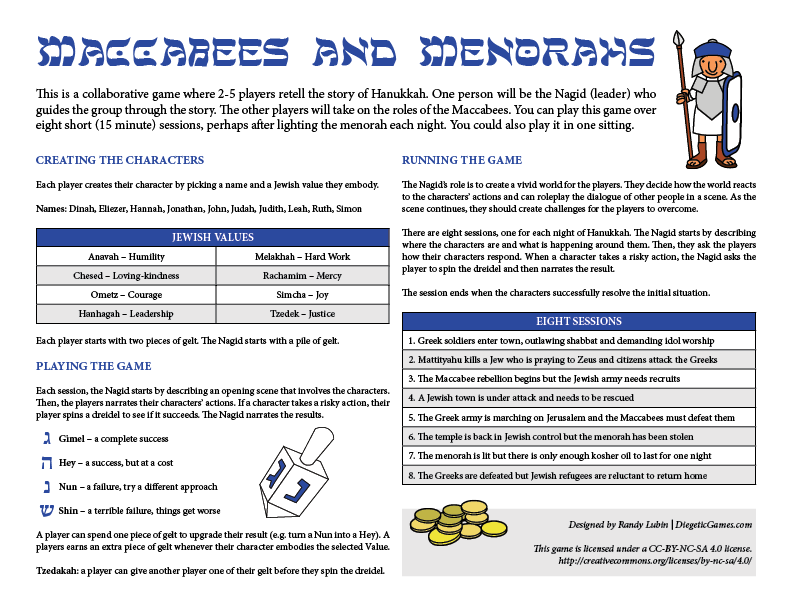
Randy sez, “Maccabees and Menorahs is a one page RPG played with a dreidel and gelt. Designed to run over 8 short sessions, one for each night of Hanukkah.”
(more…)
IFTTT
Most popular search queries for each state, 2016
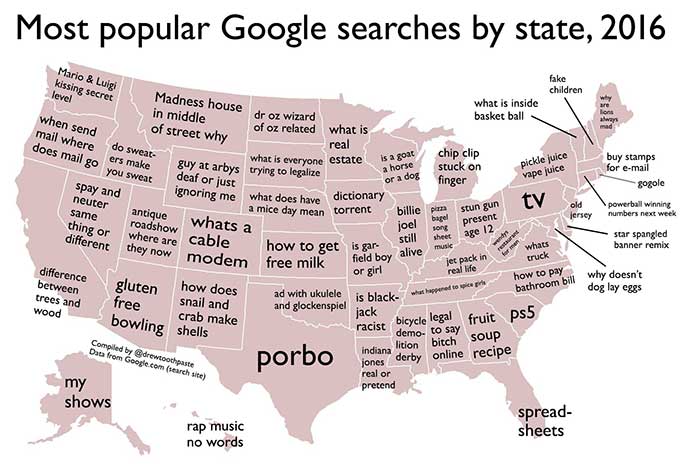
Drew Toothpaste tweeted: “Thank you to Google for helping me compile the most popular search queries for each state in the US this year!”
Finally, some real news for a change.
from Boing Boing
How the World's Best Bar Makes the Perfect Irish Coffee
When you’re relaxing at home, there’s nothing quite like an Irish coffee to get your day started. Here’s how the recently-awarded best bar in the world makes theirs.
The Dead Rabbit in New York City recently won the “World’s Best Bar” award from Drinks International, and have won “Best Bar In North America” for four years straight, so they know a thing or two about mixing up good drinks. In this video from the Travel + Leisure YouTube channel, Jillian Vose, the beverage director and bar manager of The Dead Rabbit, shows you how to mix up the best Irish coffee of your life.
Start by filling a six-ounce glass with an ounce and a 1/4 of blended Irish whiskey. Next—and this is key—blend some sugar with your hot coffee before you pour it into your glass with the whiskey in it. Then whip some cold, unsweetened cream (30% to 35% fat content) with a protein shaker bottle, and use it to top off your coffee. Now kick back and enjoy.
The Perfect Cocktail: The Dead Rabbit’s Irish Coffee | YouTube
from Lifehacker
Santa Cookies

via indulgy
Tis the Season

The Three Stages Of Santa – Potato, Terror, Glee

via sofapizza
A place to easily publish encrypted messages on the web

The Encrypted Page Maker lets you paste in a HTML document, pick a password, and then hosts the resulting page at its own site. Simple public publishing, with the source code available in the page source.
The contents of you page is compressed using LZString.js and optionally encrypted using mjsCrypt.js, and stored in the hash of a loader URL. The page loader reads the contents of the URL hash and decrypts and expands the page, setting the value of body.outerHTML. Scripts will work as they are compiled and executed after the page is loaded. Cookies and localStorage will not work between pages as they are both wiped clean when the page loads.
The encryption is unproven, and may only act as a deterent. This page and the loading pages are served over HTTP without SSL so do not trust it with actual confidential infomation. This is a toy. I hope you can have fun with it. All source code is freely avaliable in the page source.
I hope you like long URLs! The author has some other cool toys at their homepage — Ascii to Icon is great.
from Boing Boing
Dixie Chicken: 1941
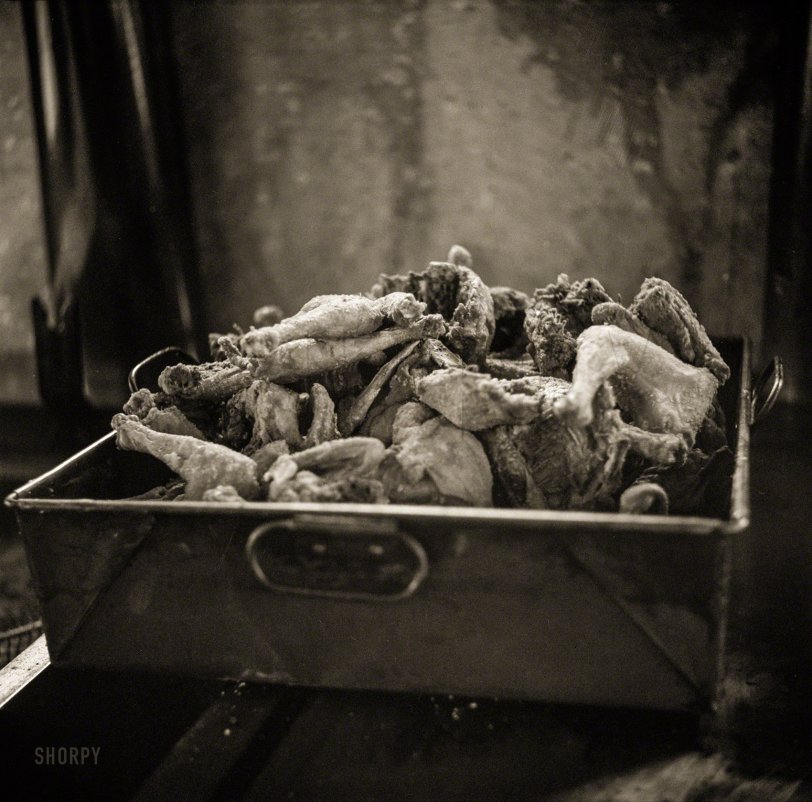
August 1941. "Feast of Farm Security Administration ‘Food for Defense’ chickens for the Craig Field flying cadets’ Sunday dinner. Southeastern Air Training Center, Selma, Alabama." Medium format negative by John Collier. View full size.
from Shorpy Historic Picture Archive – Old Photos & Fine Art Prints
This Formula Tells You If Your Flight Is a Good Deal

Flights are getting cheaper this year, but prices vary depending on your destination. To figure out whether a flight is actually a good deal, Luiz Maykot, a data science analyst for Adobe, came up with a simple formula.
The formula is pretty straightforward: multiply the trip’s round-trip miles by $0.032, then add $230.
As MarketWatch explains, if you’re flying between NYC and LA, that’s 5,640 miles total. Plug that into the formula, and you get $410.48, which means anything below $410 (taxes and fees included) is a pretty good deal. For international flights, multiply the round-trip miles by $.08 and then add $200.
Maykot explains how he came up with the formula:
I calculated the average price paid by everyone in the data sample, based on how many days in advance they purchased their tickets (up to 300 days in advance). Then, I divided the average price for each day by the overall average price and did this across thousands and thousands of flights. I was left with a weighted average of the final curve.
Put simply, the number you crunch gives you a general idea of what the majority of flight prices have been in recent years. MarketWatch explains the formula in a little more detail and also includes a calculator to help you do the math, so check out the full post at the link below.
2016 Travel Report: The Story Behind the Numbers | Adobe via MarketWatch
Photo by rch850.
from Lifehacker
This All-In-One System Rescue Toolkit Has Just the Right Tools to Troubleshoot Your PC
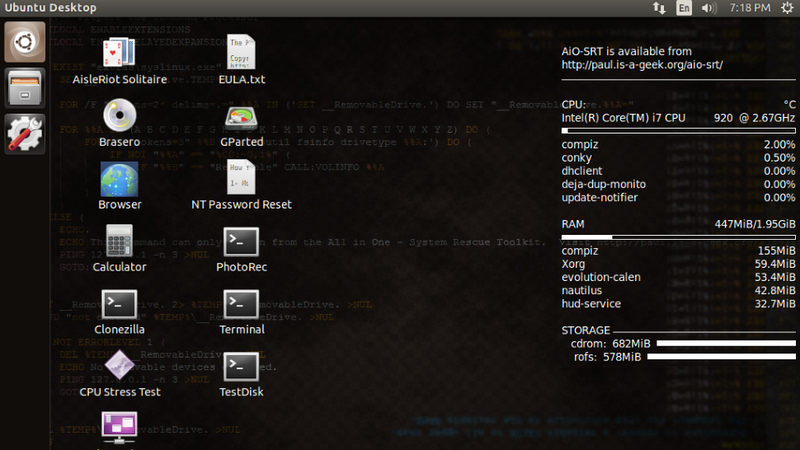
There’s no shortage of system rescue and repair discs you can download and keep handy for when your PC gives you problems, but this one, from reader Paul, is streamlined, simple, and has only a few effective tools on it (and no bloat!)
http://lifehacker.com/5984707/five-b…
Paul, who’s a field technician (I remember those days!) sent in his rescue disc to us and explained that he’d just made it available to the public on his web site. Over at his site, he explains why he bothered in a world where there are so many discs to choose from:
There are already so many utility discs out there, I know. Many of the other discs I have used in the past tried to do way more than I wanted, with sometimes 10-20 different applications and utilities that all do the same thing. This overwhelming level of choice does not easily support the faster pace required of field service work. I also wanted to have both my bootable repair environment and Windows utilities in the same package to reduce the number of discs I had to maintain and keep on hand.
This disc started as a bunch of batch files that allowed me to work on multiple computers throughout my day and replicate the same level of quality results on each computer without having to maintain checklists on paper. Even with checklists, I would sometimes skip or miss steps that meant a variety of results when fixing PCs. Thus, an automated utility was born! I have since been using this disc in my own line of work for 99% of the problems I encounter in the field.
Just because the disc is streamlined doesn’t mean there’s a shortage of tools on it, though. You’ll have to head over to his site for the full list (and to support the project!) and for download links to burn your own or make your own bootable USB drive with all of the utilities on it. There are a few standouts though—the disc is a live CD, so you can boot to it and run things like Clonezilla, GParted, NT Password Reset, PhotoRec, Terminal, and some other utilities (even a game of solitaire you can play while waiting for other stuff to finish!)
The Windows Autorun portion of the disc contains a ton of Windows diagnostics for testing, troubleshooting, and repairing bad Windows installs or partition issues, tools to extract or re-add product keys, network testing tools and speed tests, and even some security and malware removal tools. All in all, if you have a Windows PC—especially one you built yourself—or you’re in charge of maintaining others, the disc is worth a look.
All in One – System Rescue Toolkit | Paul Bryand Vreeland
from Lifehacker